Choosing the Right Battery: A Guide to AG4, LR626, LR66, 177/376/377, SR626, and SR626SW Equivalents
2024-08-08
91250
Catalog

Figure 1. Button Cell Batteries
Understanding Battery Codes and Standards
Navigating the field of button cell batteries can be daunting with the various labels and codes used. These codes, while often referring to similarly sized batteries, denote different characteristics that affect their suitability for various applications.
Interchangeable Battery Equivalents
The button cell batteries AG4, LR626, LR66, 177, 376, and 377 are interchangeable and can be used as equivalents for each other. Also, SR626 and SR626SW are also equivalent to each other. This means that if your device requires any one of these batteries, you can safely use any of the other equivalents listed without worrying about compatibility issues.
For example, if someone has a device that uses a 377 battery and can't find that exact model, they can use an LR626 instead. This interchangeability ensures the device will work perfectly without any issues.

Figure 2: Battery Equivalents
Industry Standards and Compatibility
Battery standards is useful for selecting the right one for your device. Industry standards like those from the International Electro technical Commission (IEC) ensure consistency and compatibility across different manufacturers. This standardization allows batteries from various sources to be used interchangeably, providing reliable performance.
|
Label |
Standard |
Type |
Remarks |
|
AG4 |
Non-specific |
Alkaline |
Versatile but sometimes
inconsistent |
|
LR626 |
IEC Standard |
Alkaline |
Reliable for low to
moderate power devices |
|
LR66 |
IEC Standard |
Alkaline |
Similar to LR626 with
standardization benefits |
|
177/376/377 |
Manufacturer-specific |
Alkaline |
Brand-specific,
generally interchangeable with LR626 |
|
SR626 |
IEC Standard |
Silver Oxide |
Stable voltage, longer
lifespan |
|
SR626SW |
IEC Standard |
Silver Oxide |
Similar to SR626, focus
on long-lasting performance |
Chart 1: Characteristics of Button Cell Battery Labels
These labels helps choose a battery that not only fits physically but also meets the specific power requirements of your device, ensuring optimal performance and preventing potential damage.
Technical Specifications and Performance
Voltage, Capacity, and Size Comparisons
When selecting a button cell battery, it's valuable to compare voltage, capacity, and size to ensure compatibility and optimal performance.
|
Feature |
AG4, LR626, LR66, 177/376/377 |
SR626, SR626SW |
|
Voltage |
1.5V |
1.55V |
|
Capacity |
18-20 mAh |
25 mAh |
|
Size |
6.8mm (diameter) x
2.6mm (height) |
6.8mm (diameter) x
2.6mm (height) |
|
Applications |
Watches, calculators,
small toys, medical instruments |
High-end watches,
cameras, certain medical instruments |
Chart 2: Key Features Comparison of Button Cell Batteries
Performance Metrics: Which One Lasts Longer?
Silver oxide batteries (SR626, SR626SW) generally offer a longer lifespan compared to their alkaline counterparts (AG4, LR626, LR66, 177/376/377). This makes them ideal for devices requiring consistent and reliable power over time.
For example, in a digital thermometer, using an AG4 alkaline battery might mean frequent changes as it runs out quickly, especially with regular use. On the other hand, switching to a silver oxide battery like the SR626 or SR626SW provides a longer-lasting and more stable power source. This results in fewer battery changes and more accurate temperature readings over time, making the thermometer more dependable and convenient to use.
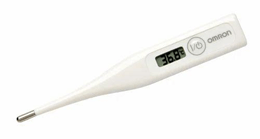
Figure 3: Digital Thermometer
Size Consistency across Different Labels
The consistent size of button cell batteries, typically 6.8mm in diameter and 2.6mm in height, allows for their interchangeability, ensuring devices like watches, calculators, and medical instruments can use AG4, LR626, LR66, 177/376/377, SR626, and SR626SW batteries without compatibility issues. This standardization simplifies design and replacement for consumers and streamlines production processes for manufacturers, reducing costs and meeting diverse consumer needs efficiently.
Common Uses and Applications
Button cell batteries are valuable to the functionality of many everyday devices. Each type of battery, such as AG4, LR626, and SR626SW, has specific applications where it excels in providing reliable power.
|
Device Type |
Common Batteries |
Key Benefits |
|
Watches |
AG4, LR626, SR626SW |
Reliable, long-lasting
power |
|
Calculators |
AG4, LR626 |
Long-lasting,
consistent performance |
|
Small Toys |
AG4, LR626 |
Easy to replace,
consistent power |
|
Medical Instruments |
AG4, LR626, SR626SW |
Reliable power, compact
size |
Chart 3: Common Devices and Their Typical Battery Types
Watches
Standard wristwatches typically use AG4 batteries for reliability without frequent replacements, while luxury watches benefit from the stable voltage and higher capacity of SR626SW batteries, ensuring long-term accuracy.
For instance, an owner of a high-end watch might prefer SR626SW batteries to minimize the inconvenience of frequent battery changes and maintain the watch's precision over time.

Figure 4: High End Watches
Calculators
AG4 and LR626 batteries provide low power consumption and long-lasting functionality, ensuring consistent performance.
For Example, A student relying on their calculator for exams would benefit from an LR626 battery, avoiding interruptions during key moments.
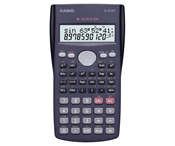
Figure 5: Calculators
Small Toys
AG4 and LR626 batteries are ideal for powering simple electronic features, providing consistent power and extending playtime without frequent maintenance.
For instance, Parents often select AG4 batteries for their child’s small battery-powered toys, ensuring they remain active and entertaining for extended periods.

Figure 6: Small Toys
Medical Instruments
AG4 and SR626SW batteries offer reliable, long-lasting power for devices like hearing aids and glucose meters, ensuring accurate readings and consistent operation.
For example, a user of a glucose meter may prefer SR626SW batteries for their stable and reliable power, reducing the need for frequent battery changes and maintaining consistent performance.
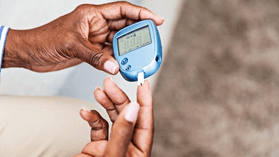
Figure 7: Glucose Meter
Tips for Prolonging Battery Life
Extend the life of your button cell batteries with these best practices:
Store in a Cool, Dry Place: Keep batteries in a moderate temperature environment to ensure chemical stability and prolong usability. Avoid extreme temperatures as both heat and cold can degrade battery performance. For example, store batteries in a drawer away from heat sources and humidity.
Minimize Exposure to Moisture: Protect batteries from moisture and humidity to prevent corrosion and reduced efficiency. Keep them in their original packaging until use to shield them from environmental factors.
Turn Off Devices When Not in Use: Continuous power drain, even in standby mode, can significantly reduce battery life. Turn off devices when they are not in use and remove batteries from infrequently used devices to prevent unnecessary power loss.
Clean Battery Contacts Regularly: Dirt and corrosion on battery contacts can impede electricity flow, causing the device to use more power. Regularly clean contacts with a soft cloth or cotton swab dipped in a small amount of rubbing alcohol to maintain efficient power use.
Avoid Mixing Batteries: Do not mix old and new batteries or different types in the same device. Mixing batteries can lead to uneven power discharge and potentially damage the device. Always replace all batteries at the same time with new ones of the same type and brand to ensure optimal performance and longevity.
Proper Disposal of Button Cell Batteries
Proper disposal and recycling of button cell batteries are valuable to minimize environmental impact and protect public health. These small batteries contain harmful chemicals and heavy metals like mercury, cadmium, and lead. If not managed correctly, they can cause significant environmental and health issues.

Figure 8: Battery Waste Management
Steps for Safe Disposal
Collect Used Batteries: Gather used button cell batteries in a specific container to keep them separate from regular household waste. For instance, you could use an old coffee tin or a small box designated for battery collection in your home.
Don't Throw Batteries in the Trash: Never dispose of button cell batteries with regular trash to prevent them from ending up in landfills. This helps avoid potential contamination and environmental harm.
Use Battery Collection Points: Take button cell batteries to local recycling centers, hazardous waste facilities, or participating retailers that offer battery-recycling services. Look out for community collection events. For example, many electronics stores have drop-off bins specifically for battery recycling.
Follow Local Disposal Guidelines: Check the manufacturer's website or local government resources for specific disposal instructions for button cell batteries in your area. This ensures you are complying with local laws and regulations.
Store Batteries Properly: Store used button cell batteries in a cool, dry place away from flammable materials. Tape the terminals to prevent short-circuiting. A small plastic container kept in a cupboard can work well for this purpose.
Consider Mail-In Programs: For large amounts of button cell batteries, use mail-in recycling programs. These services provide packaging and shipping instructions to ensure safe transport to recycling facilities. Some battery manufacturers offer prepaid mailers for this purpose.
Conclusion
Choosing the right button battery is the key to maintaining the reliable operation of your daily devices. Practical tips for extending battery life further aid in maximizing device efficiency. Importantly, proper disposal methods are valuable for minimizing environmental impact. By following these guidelines, consumers can enhance device performance, extend battery longevity, and contribute to environmental sustainability, making informed choices that benefit both their devices and the planet.
 ABOUT US
Customer satisfaction every time. Mutual trust and common interests.
ABOUT US
Customer satisfaction every time. Mutual trust and common interests.
function test. The highest cost-effective products and the best service is our eternal commitment.
Hot Article
- LM358 Dual Operational Amplifier Comprehensive Guide: Pinouts, Circuit Diagrams, Equivalents, Useful Examples
- Are CR2032 and CR2016 Interchangeable?
- Understanding the Differences ESP32 and ESP32-S3 Technical and Performance Analysis
- Choosing the Right Battery: A Guide to AG4, LR626, LR66, 177/376/377, SR626, and SR626SW Equivalents
- BC547 Transistor Basics: Pinout, Application Circuits, Alternative/Complementary Models
- NPN vs. PNP: What's the Difference?
- esp32 vs stm32: which microcontroller is better for you?
- What Is a MOSFET and How It Works?
- Electrical Relay Basic: Working Operation, Types and Uses
- PNP Transistors: Structure, Working Principle and Application
 In-Depth Look at BQ7694003DBTR: Technical Parameters, Features, and Applications
2024-08-09
 How to Effectively Use L6599DTR : Specifications and Applications
2024-08-08
Frequently Asked Questions [FAQ]
1. What are the signs that a button cell battery is nearing the end of its life?
Signs that a button cell battery is nearing the end of its life include dimming of display screens, slower operation, intermittent functioning, or the device failing to power on. In some devices, a low battery warning may appear. When you notice these signs, it’s time to replace the battery to ensure optimal device performance and avoid sudden power loss.
2. How often should I replace button cell batteries in rarely used devices?
For rarely used devices, it is advisable to replace button cell batteries every 1-2 years. Even if the device is not frequently used, batteries can degrade and potentially leak, causing damage to the device. Regularly checking the battery's condition and replacing it proactively ensures the device remains functional when needed and prevents possible damage from leaking batteries.
3. What should I do if a button cell battery gets stuck in my device?
If a button cell battery gets stuck in your device, avoid using metal tools to pry it out, as this can damage both the device and the battery. Instead, use a piece of non-conductive plastic or rubber to gently dislodge the battery. If the battery remains stuck after several attempts, it is best to seek professional assistance from a repair service to safely remove it without causing further damage to the device.
Hot Part Number
 AMK063C6223KP-F
 12065A221FAT7A
 GRM32NR61E685KA12L
 08055C104KA12A
 GRM0336R1E4R6CD01D
- GRM0336S1E6R6CD01D
 TAP155K025CRS
 T495B106K016ATE800
 TPSD336K020H0200
 TPSY336M016R0300
- SP3245ECA-L/TR
- EPM7096LI84-15
- PF38F3050M0Y3DEA
- BTN8982TAAUMA1
- CY7C65213-28PVXI
- MAX4003EUA
- T491X686K025AT7280
- TPS63024YFFR
- LT3652IMSE#TRPBF
- LM46000AQPWPRQ1
- THS4271MDGNREP
- LTC7000EMSE#PBF
- LTC2864HDD-1#PBF
- AD9200JST
- AT89LP20-20XU
- HR7P167P4RX
- ISPGDX160VA3B208-5I
- MAX3031ECSE
- MC74ACT74
- MIC25928-2YTQ
- PCA9517ATP
- PI49FCT3805BQX
- RK73B2BTTD102J
- S5D2542X01-C528
- SI7114DN
- STI5516SWC
- QM2421M3
- 86CK74AFG-6AJ0
- ASM2P2304NZF-08-TR
- BH6323GUW-E2
- CY12DP1504ZXI
- TNETD6022PWP
- CXD2834ER-T4
- EUP2624MIR1
- SKIIP83AC12ET1
- HD6413002TF10
- MB87432BPF-G-BND
- TLP185(GR,E(O
- TAS5828MDADR